Home > Working with Planning Projects > Building an Application > Building Application Models > Building A Cube Model > Advanced Features > Specifying Consolidation Logic
Specifying Consolidation Logic
Last Updated 8/26/2008 1:21 PM
The ability to define separate consolidation measure rules within Model Building provides added flexibility and efficiency options. There are a number of different requirements for determining what measure calculations should be carried out at a consolidated level. Remembering that Planning's consolidation will automatically perform any roll-ups in the model as defined by the hierarchies in each dimension, there are several situations where we may want to modify which measures are consolidated and also which measures are recalculated at the consolidated level.
Calculating Ratios
Any ratios that exist at the input level, will need to be recalculated at the consolidated level, since the consolidated value of a ratio is not really very useful. Ratios are typically a calculation involving the "/" (divide) operator. This is the default for consolidation rules, i.e. all ratios are recalculated at consolidated level.
Defining Different Measure Rules at Consolidation Level
Creating dimension lists and associated hierarchies will create consolidations automatically in Cascade Planning. In many cases, consolidation is simply an aggregation of the members immediately below the consolidated member.
Consider the following example:
EUROPE
--- LONDON
--- PARIS
--- BERLIN
--- ROME
MEASURES
SALES QUANTITY
PRICE
REVENUE = SALES QUANTITY (x) PRICE
In the above example, we collect Sales Quantity for London, Rome, Berlin and Paris profit centres, and Europe is a consolidation, so all that is required is the addition of London, Rome, Berlin and Paris to provide Sales Quantity for Europe.
However for Price, it would be pointless having a consolidated value. It would be more useful if we recalculated Price at the consolidated level as being Revenue / Sales Quantity.
Consolidated Logic enables us to do this.
Dropping Measures at the Consolidated Level
If we take the above example, a different approach might be to simply not consolidate the Price measure at all, such that it does not exist at the consolidation level. This is often true for many measures that we do not require to be consolidated. Rather than consolidate a measure that is not required at a consolidation level, we can simply exclude the measure from the consolidated level.
This can affect performance by firstly reducing the number of measures to be consolidated, and secondly, ensuring that physical disk space is not used for a measure that is not required (at consolidation level).
Creating New Measures at a Consolidated Level
Conversely, sometimes we may want to create measures that only need to exist at a consolidation level. Obviously such measures will be already derived (calculated from other measures), but it is possible to create new measures that only exist at that specific level.
Using the example above, we could drop the Price measure at the consolidated level, and define a new measure called Average Price which contains the calculation Revenue/Sales Quantity.
Suppressing Consolidation
There are certain situations where it may be useful to suppress any calculations at the consolidated level, or even suppress consolidations (we may have a custom script to calculate consolidations and therefore do not want the model builder to generate consolidations for us.
Changing Consolidated Logic
Cascade Planning provides a number of options for defining the consolidation logic:
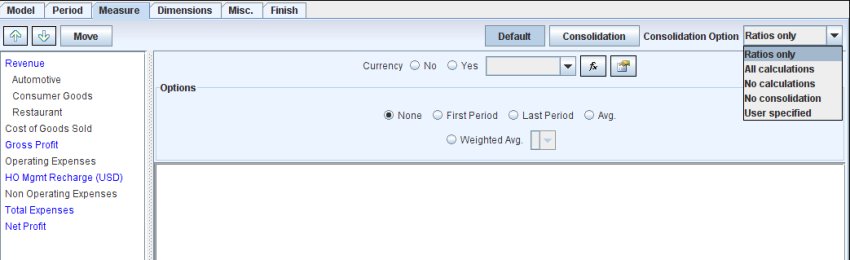
By default, Planning will assume that you wish to recalculate only ratios (calculations involving "/"). This is a reasonable assumption for most models since any other operators ("+","-","*") should give the same results if the members are consolidated.
However you may choose any of the following options to change or modify the consolidated logic.
| Ratios Only |
This is the default mode. Any calculations involving divide, are recalculated at the consolidated level |
| All Calculations |
This option basically copies the measure logic in its entirety to the consolidated level, so that all measures are recalculated |
| No Calculations |
This option strips any calculations (including ratios) from the consolidated level |
| No Consolidations |
This option suppresses the consolidation. |
| User Specified |
Allows the logic at the consolidated level to be edited. This allows us to remove or add measures at the
consolidated level as required, and also add different calculations at the consolidated level. |
To change the logic to any of the options, select the desired option from the dropdown list. You can view the consolidation logic by clicking on the  button. Note that you can only make changes to the consolidation rules if you select the User Specified option. button. Note that you can only make changes to the consolidation rules if you select the User Specified option.
To switch back to view the Default measure rules, click on the  button, and the Default measure rules will be displayed again. button, and the Default measure rules will be displayed again.
| 


 Page URL: