LinkIndexPrint
Contents
 Welcome
    Ask MaxiPlan
 Using Cascade Planning
    Data Entry Shortcuts
 Working with Planning Projects
    Designing A Cascade Project
    Project Management
       Creating and Maintaining Projects
       Period Sets
       Currencies
       Creating A Splash Screen
       Allowing Other Users Access
       Backup and Restore
       Virtual Period Definition
       Deployment Alias
       Publish Documents
       Project Status
    Building an Application
       Building Application Models
          Building A Cube Model
             Basic Setup
             Selecting a Period Set
             Measure Settings
                Defining the Measures List
                Setting Measure Attributes
                Measure Formatting
                Defining Calculations for Measures
                Other Functions for Measures Editor
                Cross Referencing Measures
                   Dimension Order in Planning Models
                   Cross Referencing Within The Same Model
                   Cross Referencing to Another Model Cube
                   Cross Referencing to the Parent of the node
                Measure Logic Functions
                   PREVIOUS function
                   SUM function
                   MAX function
                   MIN function
                   DEPRECIATION function
                   INT function
                   ROUND function
                   ROUNDUP function
                   ROUNDDOWN function
                   IF Function
                   SWITCH Function
             Dimension Settings
                Defining Dimension Lists
                Defining Dimension Properties
             Miscellaneous
             Finishing The Model
             Advanced Features
                Specifying Consolidation Logic
          Building A Transaction Model
             Basic Set Up
             Defining Dimension Lists 
             Defining Transaction Model Fields
             Additional Definition for a List Field
             Additional Definition for an Expression field
             Additional Definition for a Lookup Field
             Optional Validation for Text, Date, Integer & Value Field
             Defining Field Format & Access
             Miscellaneous
       Model Flow and Linking Models
          Using Links (the 'Push' Method)
          Cross Referencing (the 'Pull' Method)
       Deployment and Workflow
          Deploying Models for Input and Review
          Allowing Users to Extend Models
          Setting up and Managing Workflow
          Workflow for Users
       Advanced Project Functions
          Measure Filters
          Jobsets
             Defining A Jobset
             Run Jobsets
          Data Integration
             Create Dynamic Model
             Import to Cube
             Import to Transaction
             Export Cube Data
          Maintenance
             Model Maintenance
             Link Maintenance
             List Maintenance
             Calculate all cubes
             Versions
          Pre/Post Rules
 Reports and Scripting
    Define Scripts
    Define Reports
    Publish Documents
    Manage Scripts


Home > Working with Planning Projects > Building an Application > Advanced Project Functions > Pre/Post Rules

Pre/Post Rules
Last Updated 3/9/2012 2:21 AM


The Pre/Post Rules function lets you define additional rules that can be calculated for ANY dimension
It can be BEFORE (for Pre Rules) or AFTER (for Post Rules) model calculation (but before consolidation).

To get to the Pre/Post Rules function, navigate to (project name)>Advanced Processing>Pre/Post Rules
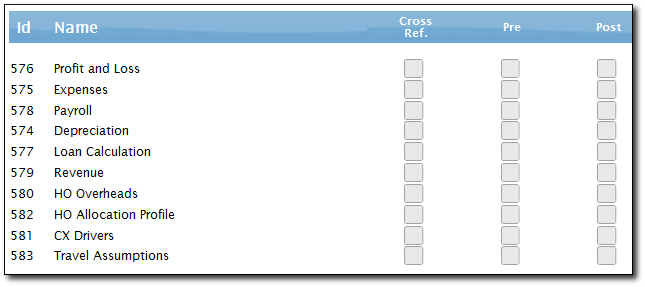


To add a pre/post rule for a model, click on the corresponding box with the model name and it will bring up a screen for you to define the rules.
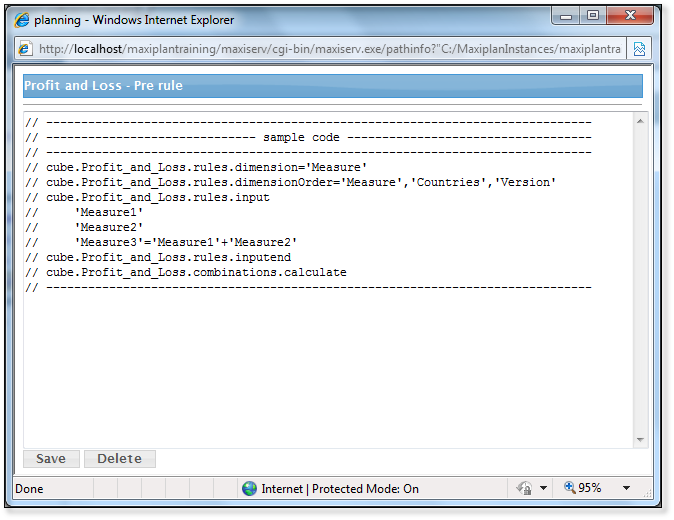


It is useful for calculations in a dimension. However, it is executed for all combinations in a model. Therefore, please use with care.
Cross-reference calculations can be included as well.

Example:
// ------------------------------------------------------------------------------
cube.Balance_Sheet.rules.dimension='Movement‘
cube.Balance_Sheet.rules.dimensionOrder='Version','Entity','Measure','Movement‘
cube.Balance_Sheet.rules.input
'Opening_Balance‘
'Expenses_Movements‘
'Capex_Movements‘
'Stock_Movements‘
'Income_Movements‘
'Journal_Adjustments‘
'Final_Balance'=PREVIOUS('Final_Balance')+'Opening_Balance'+'Expenses_Movements'+'Capex_Movements'+'Journal_Adjustments'+'Stock_Movements'+'Income_Movements‘
cube.Balance_Sheet.rules.inputend
cube.Balance_Sheet.combinations.calculate
// ------------------------------------------------------------------------------
// The above calculates the final balance sheet from the various movements
// by applying calculations to the Movement dimension, which comprises the Opening Balance member
// , several movement type members and a Final Balance member


The Cross Ref option allows you to do calculation using data from a model in another project.


cube.Expenses.structure.dimensions='Version','Countries','Measure'
cube.Expenses.structure.columns=1-13
cube.Expenses.maxidb.database='M00000444'
// ------------------------------------------------------------------------------

You will have to define the Structure dimension, the columns structure, and also what is the Model ID. However please be reminded that this model ID won't get updated when you restore the project to another machine. Therefore, a manual update is required.


See also