Home > Working with Planning Projects > Project Management > Allowing Other Users Access
Allowing Other Users Access
Last Updated 8/26/2008 12:42 PM
Giving Other Users Modelling Access to the Project
Having created your project you may want to give others users access rights to the project so that they can develop models or links within the project. This is useful for collaborative development amongst finance teams.
For example, you may want one of your team to design and develop the HR model, whilst another member of the team will develop the Sales Forecast model.
TIP: This is only necessary for users who you require to build or change models within a project. For other users that you want to have be able to input data or review data, use the Deployment feature.
Cascade allows you to assign other users access rights to your project using the SECURITY feature under Project Management.
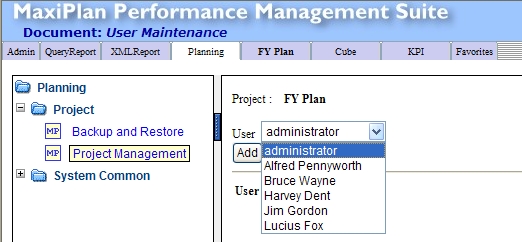
Opening the Planning tab and selecting Project Management again will display the project we created earlier. Select the  button and from the drop down list, select the users that you want to provide access to. button and from the drop down list, select the users that you want to provide access to.
You will still remain the owner of the project but the added users will be able to develop and modify models within the project.
As users are added to the list, they appear in the list of users displayed on the Project Security screen.
Deleting Another User's Access to a Project
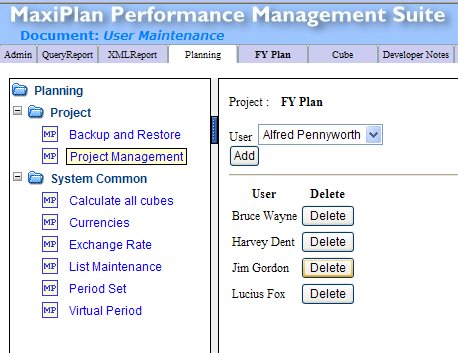
To delete a specific user's access, go to the Project Management screen, select and then select the  button next to the name or the person you wish to remove access rights for. button next to the name or the person you wish to remove access rights for.
See also
Creating and Maintaining Projects
Period Sets
Currencies
Creating A Splash Screen
Backup and Restore
Virtual Period Definition
Deployment Alias
Publish Documents
Project Status
| 


 Page URL: