LinkIndexPrint
Contents
 Welcome
    Ask MaxiPlan
 Using Cascade Planning
    Data Entry Shortcuts
 Working with Planning Projects
    Designing A Cascade Project
    Project Management
       Creating and Maintaining Projects
       Period Sets
       Currencies
       Creating A Splash Screen
       Allowing Other Users Access
       Backup and Restore
       Virtual Period Definition
       Deployment Alias
       Publish Documents
       Project Status
    Building an Application
       Building Application Models
          Building A Cube Model
             Basic Setup
             Selecting a Period Set
             Measure Settings
                Defining the Measures List
                Setting Measure Attributes
                Measure Formatting
                Defining Calculations for Measures
                Other Functions for Measures Editor
                Cross Referencing Measures
                   Dimension Order in Planning Models
                   Cross Referencing Within The Same Model
                   Cross Referencing to Another Model Cube
                   Cross Referencing to the Parent of the node
                Measure Logic Functions
                   PREVIOUS function
                   SUM function
                   MAX function
                   MIN function
                   DEPRECIATION function
                   INT function
                   ROUND function
                   ROUNDUP function
                   ROUNDDOWN function
                   IF Function
                   SWITCH Function
             Dimension Settings
                Defining Dimension Lists
                Defining Dimension Properties
             Miscellaneous
             Finishing The Model
             Advanced Features
                Specifying Consolidation Logic
          Building A Transaction Model
             Basic Set Up
             Defining Dimension Lists 
             Defining Transaction Model Fields
             Additional Definition for a List Field
             Additional Definition for an Expression field
             Additional Definition for a Lookup Field
             Optional Validation for Text, Date, Integer & Value Field
             Defining Field Format & Access
             Miscellaneous
       Model Flow and Linking Models
          Using Links (the 'Push' Method)
          Cross Referencing (the 'Pull' Method)
       Deployment and Workflow
          Deploying Models for Input and Review
          Allowing Users to Extend Models
          Setting up and Managing Workflow
          Workflow for Users
       Advanced Project Functions
          Measure Filters
          Jobsets
             Defining A Jobset
             Run Jobsets
          Data Integration
             Create Dynamic Model
             Import to Cube
             Import to Transaction
             Export Cube Data
          Maintenance
             Model Maintenance
             Link Maintenance
             List Maintenance
             Calculate all cubes
             Versions
          Pre/Post Rules
 Reports and Scripting
    Define Scripts
    Define Reports
    Publish Documents
    Manage Scripts


Home > Working with Planning Projects > Building an Application > Building Application Models > Building A Cube Model > Measure Settings > Defining the Measures List

Defining the Measures List

Last Updated 5/28/2012 4:13 PM

Measures must be specified for any cube model. In a spreadsheet environment, we would need to specify the calculations in each cell of the spreadsheet. This approach provides a lot of flexibility, but is sometimes tedious and can be error prone. Within MaxiPlan, we define calculations based on the rows in our model. Whilst we can directly reference a specific column, this approach provides a much more flexible and easily mainatained environment, regardless of any changes made to other dimensions (such as periods).

Let us assume we wish to define the following measures and associated calculations


SALARY AND BENEFITS
TRAVEL COSTS
MARKETING
TRAINING
OFFICE COSTS = ADMINISTRATIVE + OFFICE LEASE + UTILITIES + OTHER OFFICE EXPENSES
ADMINISTRATIVE
OFFICE LEASE 
UTILITIES
OTHER OFFICE EXPENSES
OTHER EXPENSES
TOTAL EXPENSES = SALARY AND BENEFITS + TRAVEL COSTS + MARKETING + TRAINING + OFFICE COSTS + OTHER EXPENSES

To  set these measures up in model builder, we first select the Measures tab. This will display the Measures editing screen.

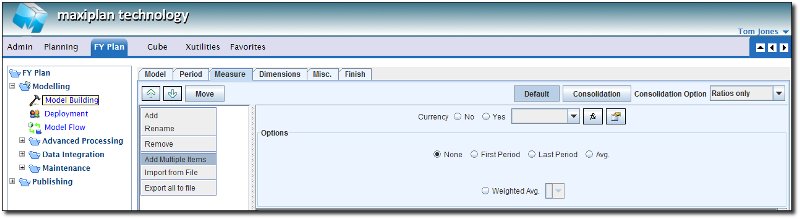
To enter new measures, right click on the empty list of measures to the left of the frame, and a popup will appear in the list window providing a menu list of options.

We will select the option to Add Multiple Items.


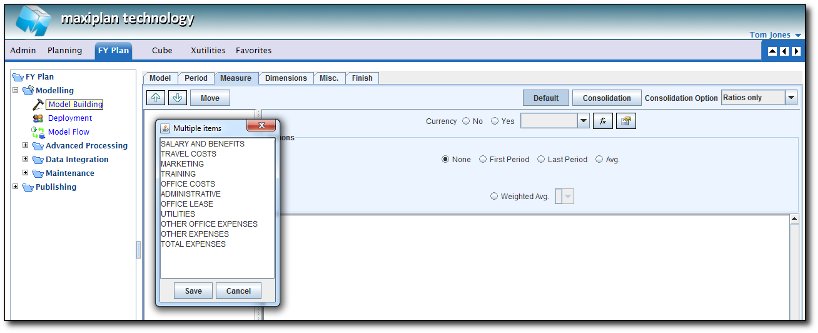
A popup window will appear, and we can simply type in the list of measures we wish to have in our model.

When we have finished, we can simply select to save the measures in our list.


TIP: You can 'cut and paste' the list of variables from another application such as a spreadsheet or word processing document if you wish.


See also


Setting Measure Attributes
Measure Formatting
Defining Calculations for Measures
Other Functions for Measures Editor
Cross Referencing Measures
Measure Logic Functions


Building a Cube Model